OKAERI — Palate memory for drinks
A tasting-room app that remembers what each guest loved — guests rate pours from a QR code at the bar, and staff get a checked, one-line suggestion for what to pour next. Designed in Figma and built end to end.
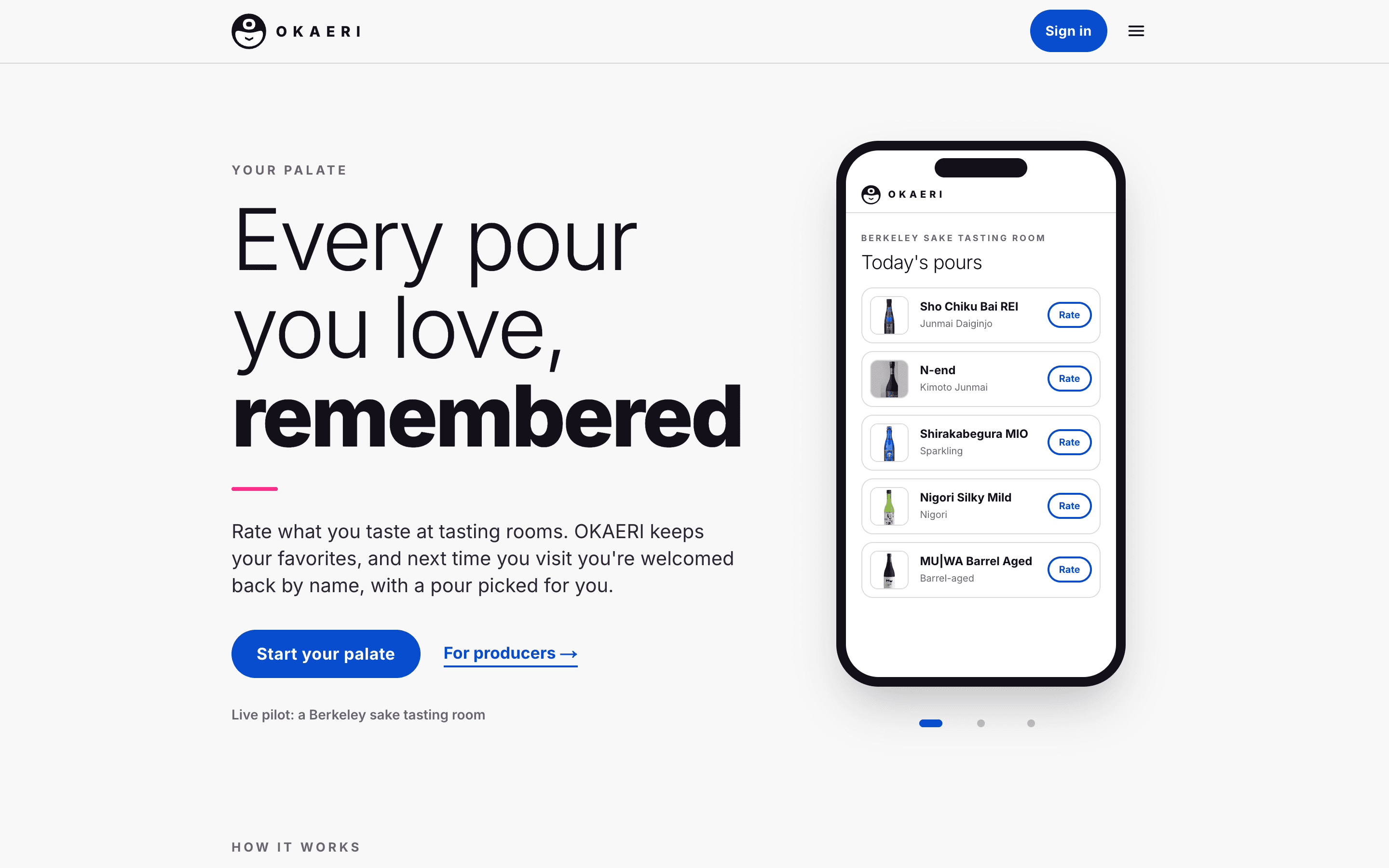
Okaeri (おかえり) is what you say in Japanese when someone you know comes home: welcome back. OKAERI is a palate memory for drinks. A guest scans the QR code on the bar, sees today's pours and rates what they taste; the next time they visit, the staff can greet them by name with a pour they'll probably love.
It's being tried with a Berkeley sake tasting room. The guest side is free and works on any phone without an app to install; the producer side gives the tasting room its visits, returning guests and a shared memory of what each guest likes.
Problem
A tasting flight is a great first impression and a poor memory aid. Guests try four or five pours, enjoy one, and can't remember which by the time they're in a store. On the other side of the bar, the staff remember faces, not palates — the regular who loves rich, aged sake gets the same opening speech as a first-time visitor.
The tools that exist don't fit the moment: wine-club software is built around shipments and payments, and a generic AI chatbot will happily recommend a bottle the tasting room isn't pouring today. What staff need is a short, trustworthy answer — what this guest liked, and what to pour them from today's list.
My role
I designed and built OKAERI on my own, end to end: the Figma design system, user flows and mockups; the Next.js front end; the Supabase database with row-level security on every table; the Groq-powered agent team; and the deploys on Vercel. I worked in small steps, each one shipped to a preview and checked before the next.
Process
Two front doors
The same app serves two very different people, so it has two front doors: “Every pour you love, remembered” for guests and “Every guest, remembered” for producers. A first visit asks one question — here to taste, or run a tasting room — and remembers the answer on that device.
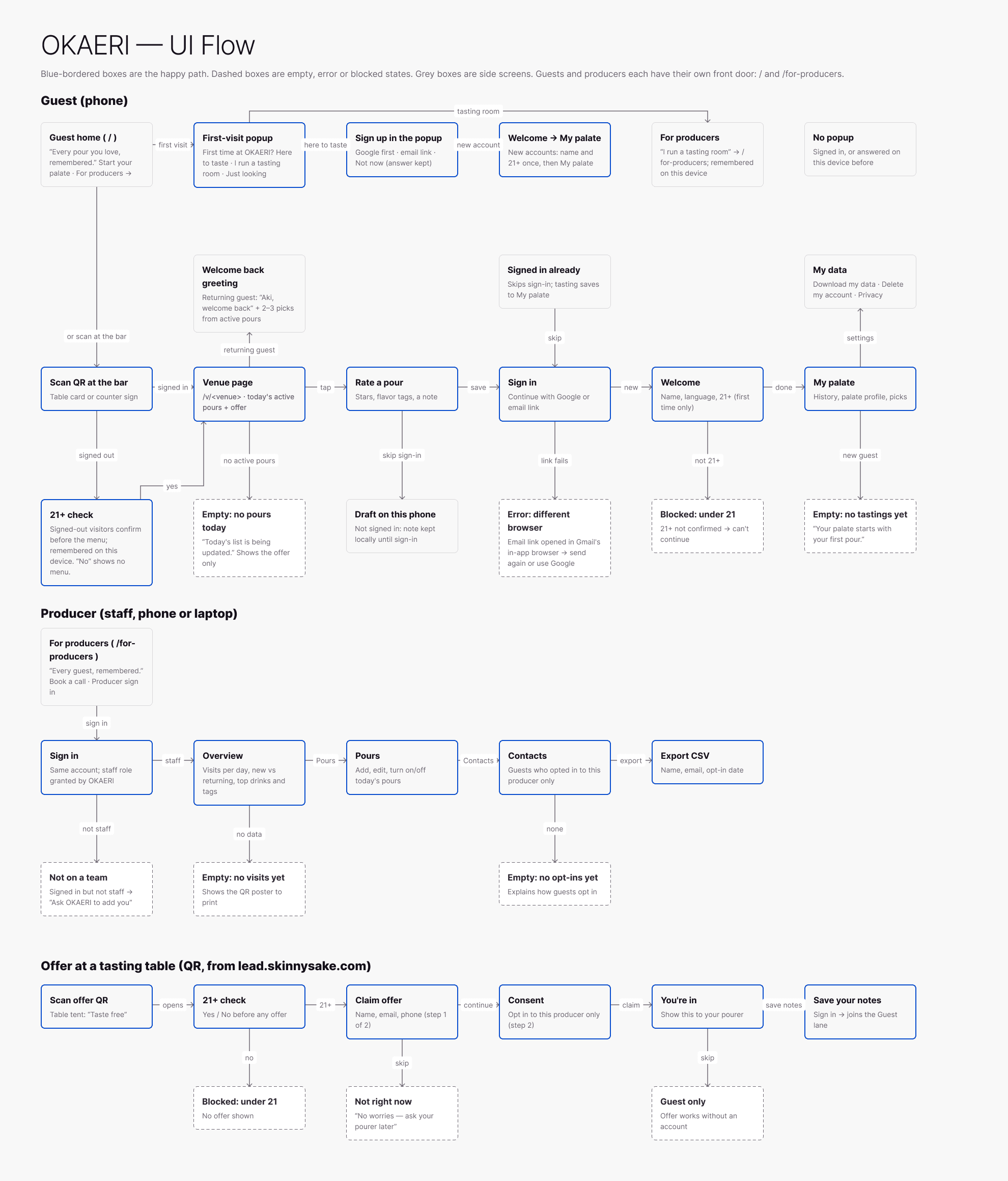
UI flow in Figma — guest, producer and offer lanes. Blue boxes are the happy path; dashed boxes are empty, error or blocked states.
A design system first
I built a small “Washi” design system in Figma — variables, text styles and components — before the screens: a light grey page, white cards, ink type, blue reserved for things you can tap, and sakura pink only for decoration. The app's CSS tokens mirror the Figma variables one to one.
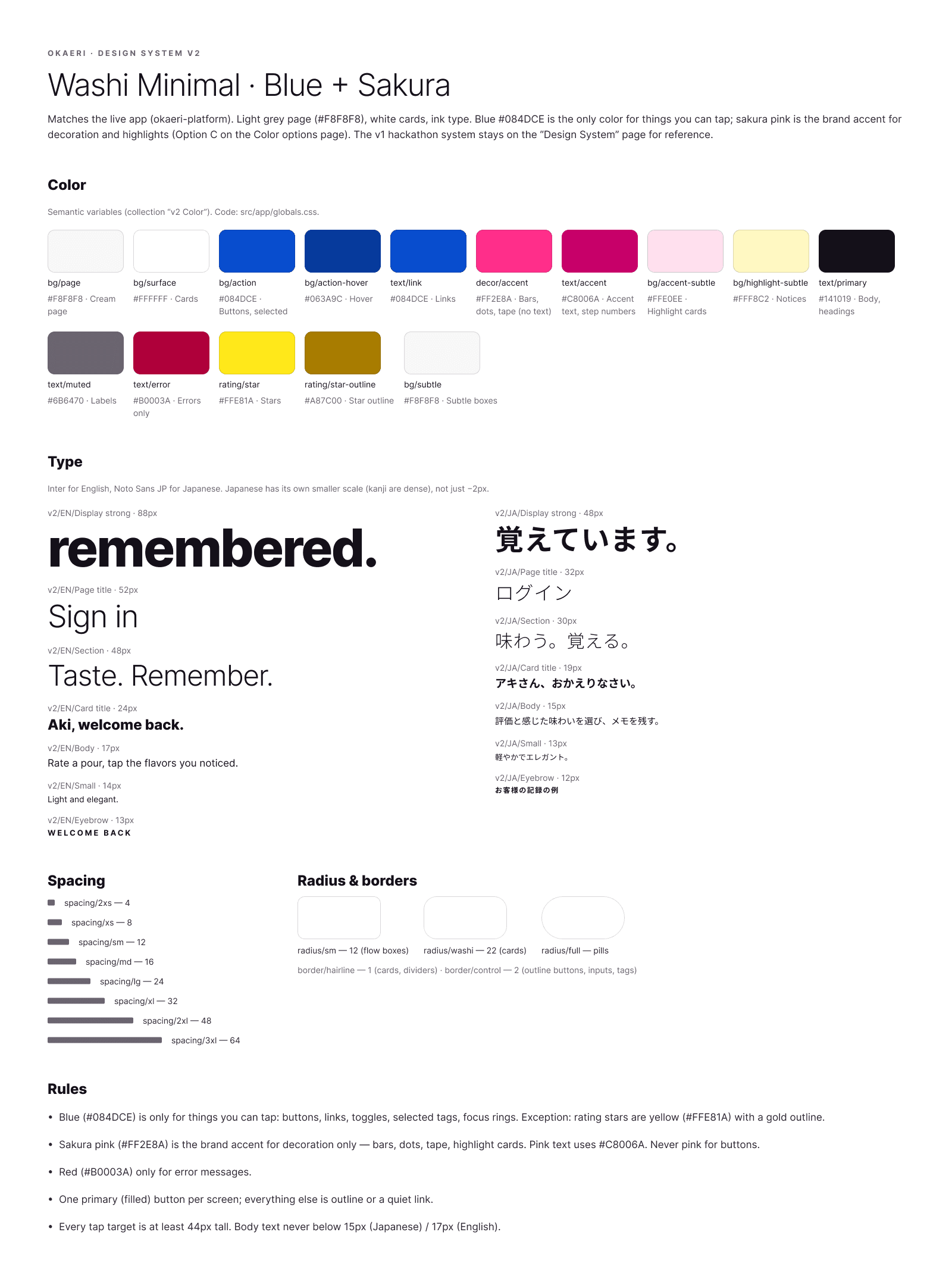
Foundations — semantic color variables, separate English and Japanese type scales, spacing, radius and the rules: blue only for taps, sakura only for decoration, red only for errors.
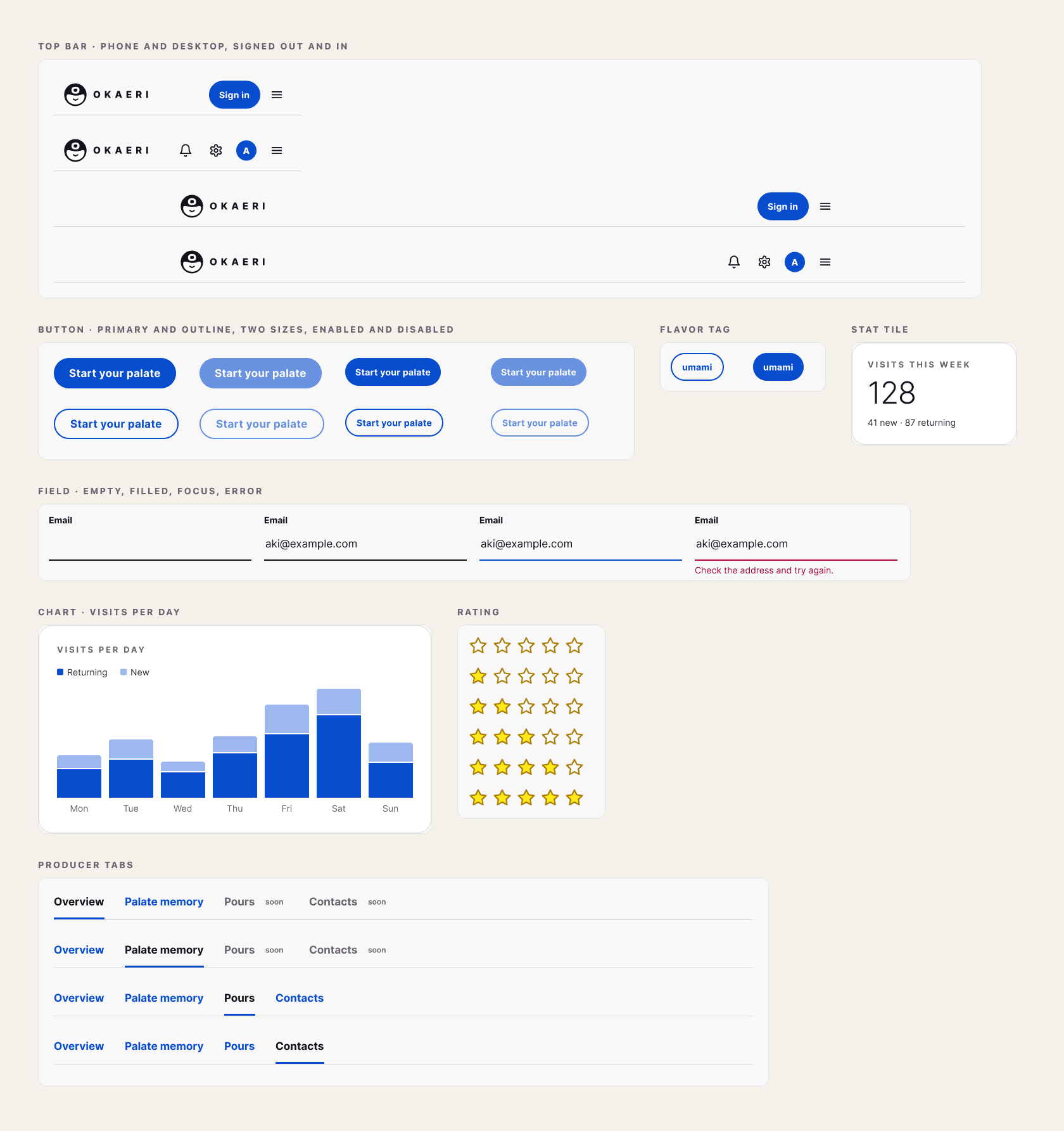
Components built on those variables — top bar, buttons, flavor tag, stat tile, field states, visits chart, rating and producer tabs. Numbers are sample data.
Mockups checked against the live app
The UI flow, guest and staff mockups live in the same Figma file. As the app changed, I compared each frame with a screenshot of the live app at the same width and fixed the drift, so the design file stays a true picture of the product.
Built for the bar, not the desk
Guests can rate without signing in: ratings stay on the phone and move to their palate once they sign in with Google or an email link. Signed-out visitors confirm they're 21 or older before the menu. Prices, tasting tags and today's pours all come from the tasting room's own list.
Guest experience
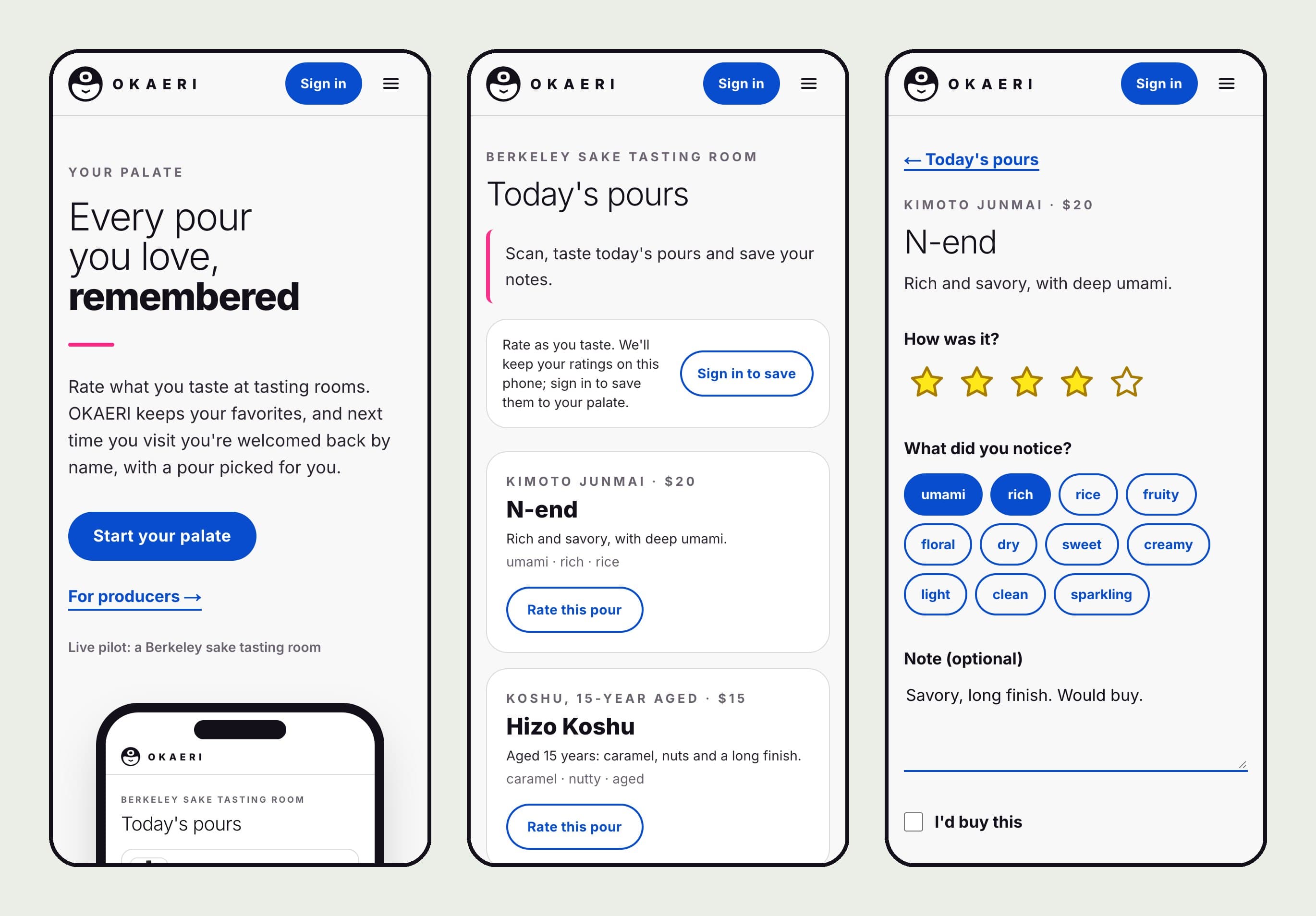
Home, today's pours from the QR code, and rating a pour — stars, flavor tags, a note and “I'd buy this.” The tasting room's name is shown generically here.
Staff experience
Palate memory works like a small CRM inbox: a searchable list of guests on the left, and on the right everything the staff have noted about one guest, with a Next pour card at the top. Two guests with the same name stay separate, and a note is linked to a guest's OKAERI account only if that guest has chosen to share with this tasting room.
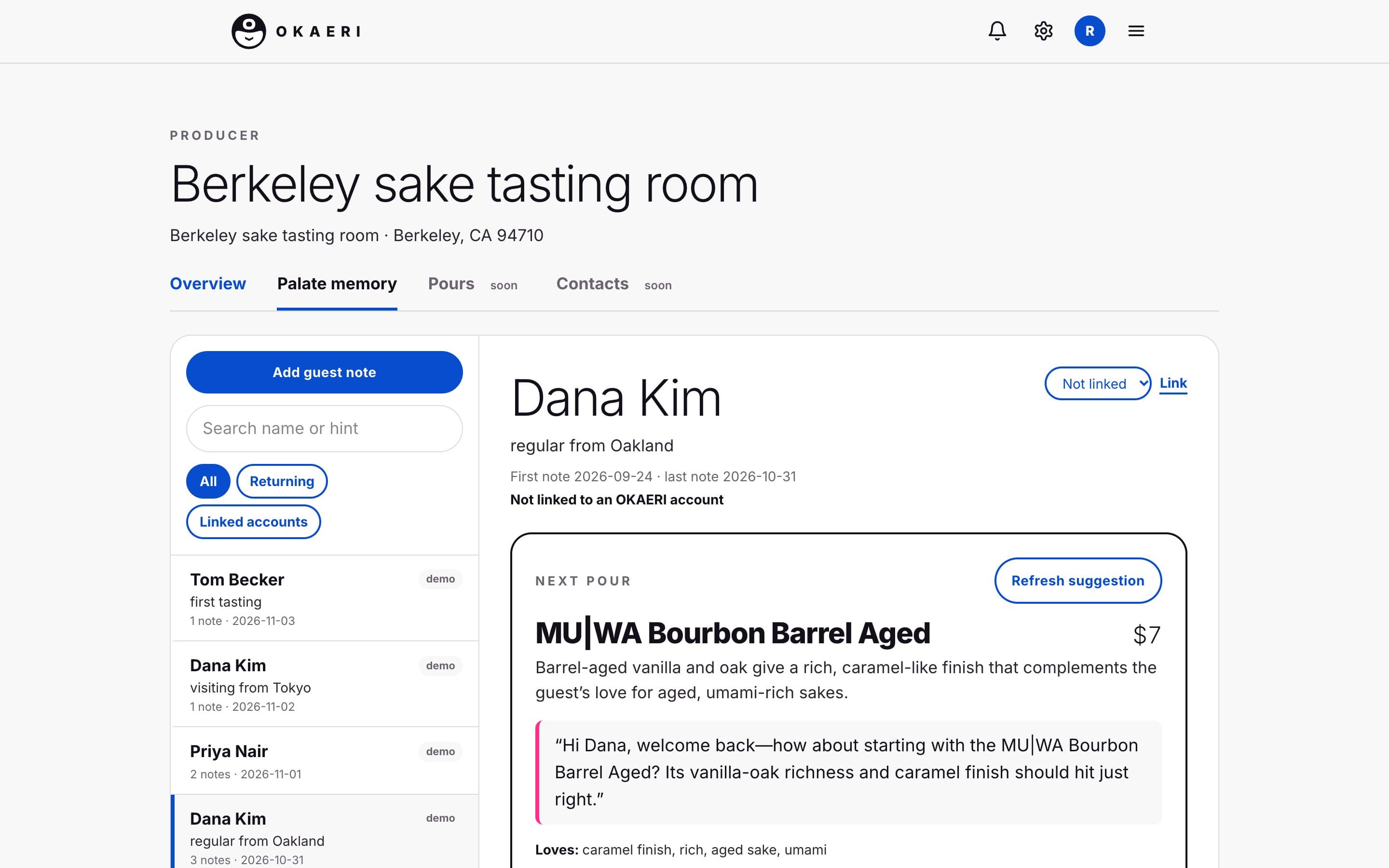
The staff inbox with demo guests. The Next pour card names a pour from today's list, why it fits, and a line the server can say out loud.
Agent design
Behind the Next pour card is a small team of agents, each with one job — closer to a kitchen brigade than a chatbot. Three are AI; one, deliberately, is plain code.
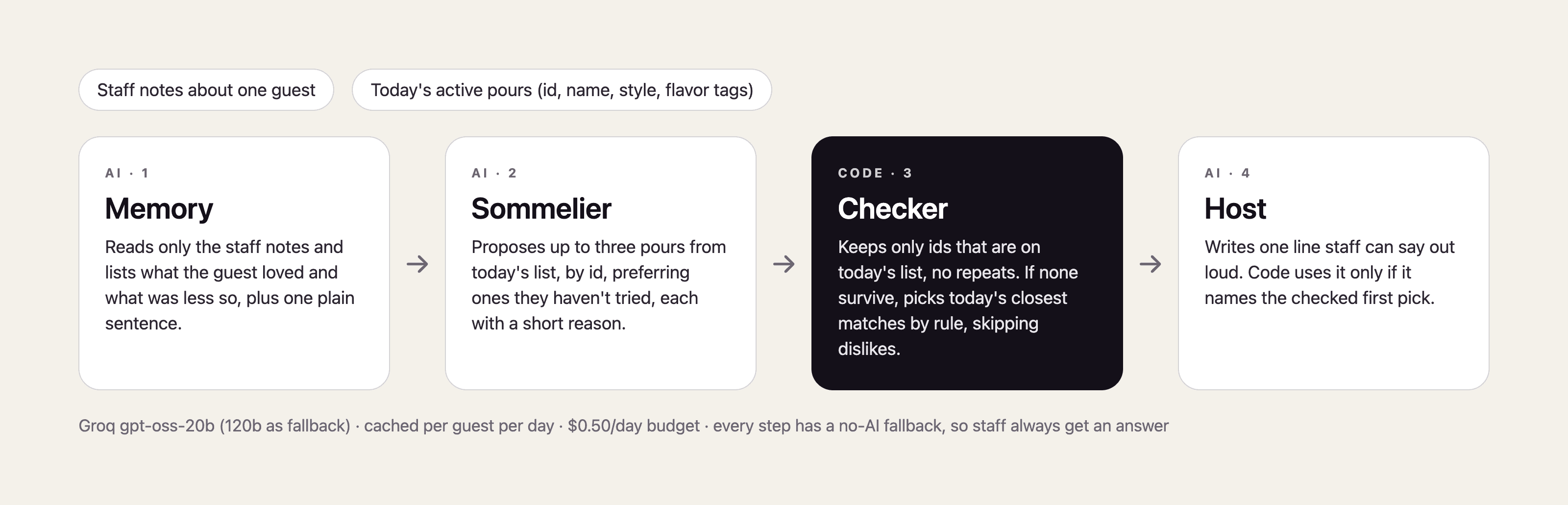
Memory
Reads only the staff notes about this guest and lists what they loved and what was less so. It's told never to add anything that isn't in the notes.
Sommelier
Proposes up to three pours, by id, from today's active list only, preferring ones the guest hasn't tried, each with a short reason.
Checker
Plain code, not a model. It keeps only picks that are really on today's list, removes repeats, and if nothing survives, picks today's closest matches by rule while skipping anything the guest disliked.
Host
Writes the one sentence a server can say. Code accepts it only if it names the Checker's first pick; otherwise staff get a plain line that does.
Why code checks the AI
A suggestion that names a bottle the room isn't pouring is worse than no suggestion: the server loses face in front of the guest and stops trusting the tool. Language models are good at reading messy notes and phrasing a warm sentence, but they can't be relied on to respect today's list. So the model proposes and code decides: picks are checked against the real menu by id, the greeting must match the checked pick, and every step has a rule-based fallback, so staff always get an answer even when the AI is down or the day's budget is spent.
The agents run on Groq's gpt-oss-20b with the larger model as a fallback. Answers are cached per guest per day and refreshed only when the notes or today's pours change, Palate memory has its own daily AI budget, and every call is logged with its cost.
Privacy decisions
- Guests own their notes. A tasting room sees visits and ratings only as totals, and a guest's name and email only if that guest turns on sharing with that tasting room — and can turn it off.
- Staff notes are for taste only (“likes dry, fruity sake”), never health or personal details, and only that tasting room's staff can read them. Guests can ask to have them deleted, and deleting an account deletes linked notes.
- Every table has row-level security, and automated tests try to read across tasting rooms and accounts to prove they can't — including deliberately broken policies to make sure the tests catch leaks.
- The AI only receives what it needs: the staff notes about one guest and today's pour list. Nothing is sold, and the privacy page says exactly what goes to the AI provider.
- Email is opt-in only. Guests sign in with Google or a one-time email link; there are no passwords to leak.
What's next
Pours and Contacts tabs for producers are designed and marked “soon” in the app. The next step is real use at the bar, and measuring whether returning guests and bottle sales actually go up — there are no results to report yet.